
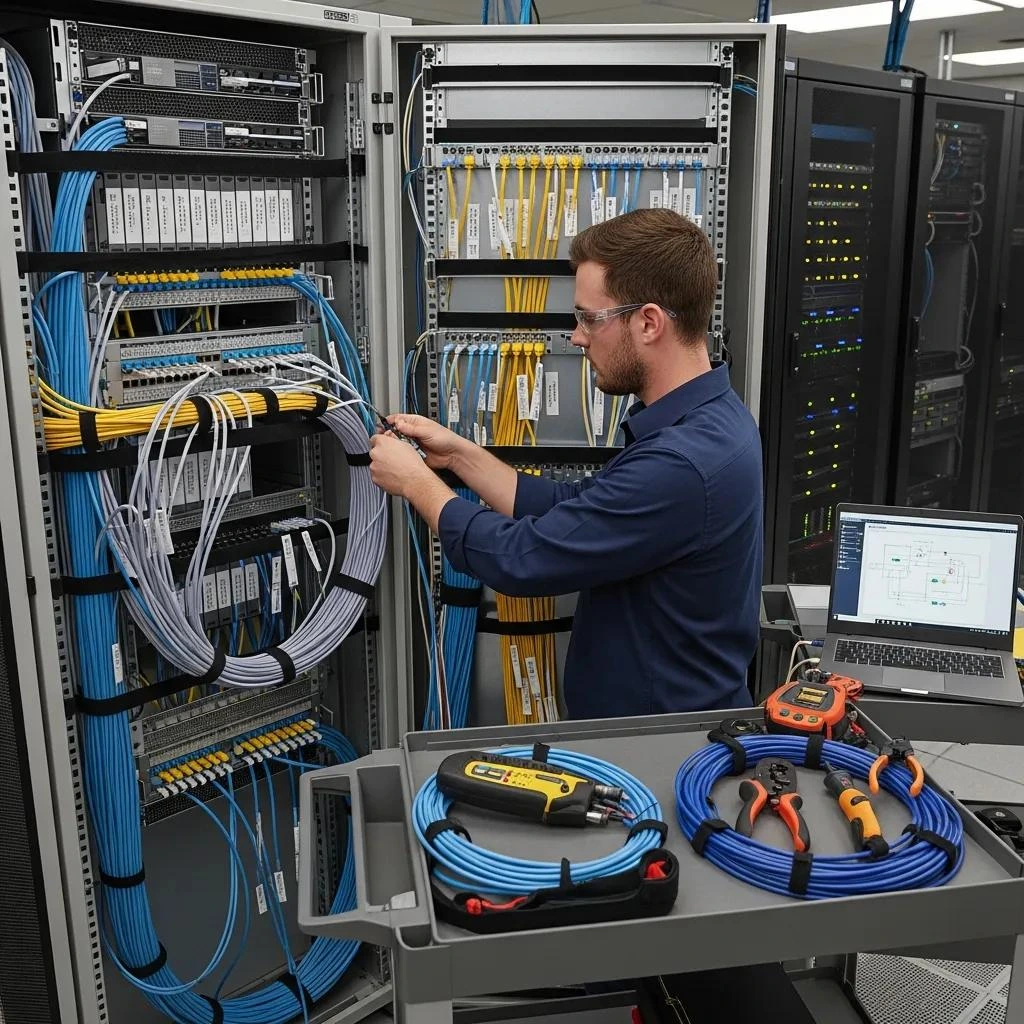
Reliable audio visual systems fail most often because cabling and network infrastructure are underspecified or installed without future growth in mind. This guide explains how structured cabling, AV over IP readiness, and standards-based data cabling reduce downtime, preserve signal integrity, and enable scalable commercial AV systems. You will learn practical design rules for Cat6a and fibre deployments, a network checklist for AV over IP, and step-by-step installation and documentation best practices that support boardroom AV, video conferencing, and PA systems. The article maps structured cabling benefits, network component requirements, and maintenance routines into actionable recommendations for IT and AV teams managing commercial spaces. Where relevant, Genconnect Technologies is referenced as a local Sydney provider that combines IT, AV and cabling expertise to implement the approaches described. Read on for comparison tables, installation checklists, and real-world examples that help you specify the best cabling services for seamless AV integration.
What Are Structured Cabling Solutions for AV Systems?
Structured cabling is a standards-based, modular wiring approach that organises communications pathways so multiple systems, data, voice and AV, share a coherent backbone. It works by centralising patching into comms cabinets, using consistent labelling, and applying separation principles to protect signal quality, which improves reliability and simplifies maintenance. The result is a predictable AV distribution platform that supports AV over IP, PoE devices, and future upgrades without disruptive re-cabling. Below are the primary benefits of structured cabling for commercial AV deployments.
- Reliability: Reduces ad-hoc splices and field terminations that cause intermittent faults.
- Scalability: Modular patching and spare ports allow new AV endpoints to be added quickly.
- Maintainability: Centralised documentation and labelling speed fault diagnosis and change management.
Structured cabling also enforces electrical separation and pathway discipline to reduce interference and crosstalk, which directly improves media quality in boardrooms and auditoria. The next subsection explains how those mechanisms translate into better AV performance in real installations.
How Does Structured Cabling Enhance Commercial AV Performance?
Structured cabling enhances AV performance by preserving signal integrity through controlled cable routing, correct shielding choices, and centralised patching that minimises connector transitions. Signal loss and crosstalk are reduced when balanced copper pairs are kept away from power runs and when shielded cable is used in electrically noisy environments, yielding clearer audio and cleaner video. Centralised comms cabinets let integrators map and patch AV endpoints quickly, improving uptime and simplifying redundancy practices. Regular certification and testing of links, measuring return loss, NEXT and attenuation, ensures installed performance meets the expectations for high-resolution streaming and low-latency conferencing. These testing protocols form the basis for service level agreements and make future troubleshooting predictable and fast.
Which Cable Types Are Ideal for High-Bandwidth AV Networks?
Choosing cabling depends on run length, bandwidth needs and budget; Cat6a and fibre are commonly deployed for high-bandwidth AV networks. Cat6a supports 10 Gbps over typical campus runs and is cost-effective for many boardroom and meeting-room applications, while multimode and singlemode fibre are used for longer backbones or aggregated switch links where distances or future 40/100 Gbps growth are expected. Shielded twisted pair is appropriate where EMI is present; unshielded is acceptable in office environments with disciplined pathways. The table below compares common cable options by key characteristics.
| Cable Type | Max Bandwidth | Practical Distance (AV) | Typical Cost | Ideal AV Applications |
| Cat6a | 10 Gbps | Up to 100 m (10 G) | Moderate | Boardroom AV, 4K AVoIP endpoints, PoE cameras |
| Multimode Fibre (OM4) | 10-40 Gbps | Up to 550 m (depending on speed) | Higher | Campus backbone, switch aggregation for AV |
| Singlemode Fibre | 10 Gbps → 100+ Gbps | Kilometres | High | Long-distance interbuilding AV links, campus backbones |
| Shielded Cat6 / Cat7 | 10 Gbps+ | Up to 100 m | Higher than UTP | Environments with strong EMI, AV racks near power equipment |
This comparison shows Cat6a is the practical choice for most internal AV runs while fibre secures backbone capacity for aggregated AV traffic and future-proofing. The next major section explains how AV over IP leverages these cabling choices and what network requirements are essential.
How Do AV Over IP Cabling Solutions Support Modern Integration?
AV over IP (AVoIP) moves audio and video streams onto standard Ethernet networks, enabling flexibility, centralised control, and easy scaling across multiple rooms. It functions by encoding media into IP packets, relying on network infrastructure, managed switches, QoS, multicast support and adequate bandwidth, to deliver synchronised, low-latency streams.
The principal advantages include device-agnostic routing, rapid reconfiguration of displays and endpoints, and simplified central management for digital signage and conferencing. The following checklist summarises network requirements for reliable AVoIP deployments.
- Managed switches with multicast support and IGMP snooping to prevent unnecessary traffic floods.
- Quality of Service (QoS) policies that prioritise AV traffic and minimise jitter and packet loss.
- Sufficient aggregate bandwidth and headroom for multiple 4K/8K streams and bursty codec behaviour.
- Segmentation via VLANs to isolate AV traffic from general data while enabling controlled routing.
- Redundancy and link aggregation options for critical paths to maintain availability.
When planning cabling for AVoIP, ensure backbone fibre and Cat6a edge runs align with switch port speed requirements and that PoE budgeting is accounted for when powering cameras and microphones. The following table outlines core network component features that support stable AV over IP operations.
| Component | Required Feature | Reason / Benefit |
| Managed Switch | Multicast, IGMP Snooping, QoS | Prevents traffic storms and ensures timely delivery of streams |
| Aggregation Links | 10/25/40/100 Gbps capable backbones | Provides headroom for multiple simultaneous 4K streams |
| VLANs | Layer 2/3 segmentation | Isolates AV traffic and simplifies policy enforcement |
| PoE-capable Switches | IEEE 802.3af/at/bt PoE budgeting | Powers cameras, microphones and encoders without separate power runs |
This breakdown clarifies how network components function as enablers for AVoIP; the next subsection discusses how Ethernet cabling is implemented practically for seamless AV distribution.
What Are the Network Requirements for AV Over IP Systems?
AV over IP systems demand switches that handle multicast efficiently, enforce QoS, and offer sufficient throughput for peak concurrency. Managed switches must support IGMP snooping to confine multicast traffic to relevant ports, while QoS queues and DSCP markings keep audio and control packets ahead of bulk data. Capacity planning requires modelling the number of concurrent streams, codec bitrates (including bursts), and peak usage scenarios to provide appropriate uplink and backbone sizing. VLANs and ACLs protect quality and security by isolating AV domains while preserving authorised control-plane access for device management. Monitoring and telemetry, SNMP or modern API-based monitoring, allow operators to observe jitter, packet loss and latency and to trigger remediation before meetings are affected.
How Is Ethernet Cabling Implemented for Seamless AV Distribution?
Implementing Ethernet cabling for AV distribution combines cable choice, labelling discipline, and port-level mapping to ensure predictable behaviour at deployment and during changes. Ports should be consistently labelled on patch panels and switches using a documented schema that ties physical jacks to room functions and device IDs, which simplifies remote diagnostics and configuration rollback. PoE planning must include total wattage and budget per switch plus cable length impacts on power delivery; for high-draw devices, place powered devices near appropriate switch ports or use local injectors judiciously. Testing each run with certification tools, and recording test results in the as-built documentation, confirms that links meet performance expectations before system commissioning. The next section addresses installation best practices that make these principles operational.
What Are the Best Practices for Commercial Audio Visual Wiring Installation?
Best practices for commercial AV wiring follow a four-stage workflow: planning and site survey, disciplined installation, rigorous testing and certification, and comprehensive documentation. Planning identifies pathway capacity, conduit sizing, comms cabinet location, and room endpoint counts to avoid late-stage rework. During installation, pathway segregation (power vs data), appropriate cable support (trays, ladders), and neat rack-mounted termination with labelled patching reduce future faults and speed maintenance. Post-installation testing ensures each link satisfies specified performance metrics and provides a defensible baseline for SLAs. The numbered steps below provide a concise how-to that operators can apply as a checklist during projects.
- Survey & Design: Confirm endpoint counts, bandwidth needs, and conduit fill to reserve capacity for growth.
- Install & Segregate: Route data separately from power, secure cables within trays, and use appropriate shielding where needed.
- Test & Certify: Use industry testers to record loss, NEXT and return loss; retain test reports for every link.
- Document & Label: Deliver as-built diagrams, port labelling, and equipment lists for future operations.
Adopting these steps reduces surprises during commissioning and supports rapid fault isolation later. The table below lists essential installation deliverables that clients should expect and why they matter.
| Deliverable | Contains | Value to Client |
| As-built Diagrams | Floorplans, rack elevations, cable routes | Speeds troubleshooting and planning for upgrades |
| Test Reports | Per-link certification results | Provides performance proof and warranty support |
| Port Labelling | Label schema mapping jacks to services | Reduces downtime and human error during maintenance |
| Inventory List | Switch ports, patch panel ports, spare capacity | Enables capacity planning and prevents overcommitment |
These deliverables create a clear operational baseline; the next subsections explore designing future-proof infrastructure and practical cable management techniques.
How to Design Future-Proof AV Integration Infrastructure?
Future-proof AV infrastructure begins with reserving spare capacity in both conduit and comms cabinets, and by adopting modular rack and patching architectures that accommodate growth without wholesale rework. Design rules of thumb include reserving 20–30% spare ports on initial switch deployments, sizing conduits for expected doubled cable counts, and using tray fill guidelines that allow easy cable addition. Choosing fibre backbones with headroom for higher-speed optics enables future aggregation and uplifts, while standardising on Cat6a or better at the edge reduces the need for later upgrades as endpoint bandwidth increases. Documenting upgrade pathways and labelling spare ports clarifies how to scale the system with minimal disruption and supports predictable total cost of ownership over time.
What Are Effective AV Cable Management and Maintenance Techniques?
Effective cable management combines neat physical organisation with scheduled maintenance and clear labelling to reduce downtime and simplify diagnostics. Use patch panels, vertical cable managers, Velcro straps and segregated trays to prevent stress on terminations and to maintain airflow in racks. Implement a routine re-certification schedule, typically tied to major updates or on a multi-year cadence, to catch degradation or accidental damage and to refresh documentation. For troubleshooting, maintain a short diagnostics checklist that includes link test, power budget check for PoE devices, and switch port swap testing to isolate faults quickly. Consistent hardware labelling and an up-to-date inventory make these activities efficient and keep audiovisual systems reliable for daily use.
How Does Data Cabling Improve Video Conferencing Systems?
High-quality data cabling reduces packet loss, jitter and latency, which directly improves audio-video sync and meeting stability in video conferencing systems. Proper cabling supports PoE for cameras and microphones, eliminates intermittent connectivity that causes call drops, and provides consistent bandwidth for high-resolution streams. By using standards-compliant cables and certified links, organisations ensure that endpoints receive predictable performance and that IT can enforce QoS policies without physical-layer surprises. The following benefits summarise how investments in cabling translate into better conferencing outcomes.
- Low latency and stable streams that prevent choppy audio and lip-sync issues.
- Reliable PoE delivery enabling clean installations for cameras, mics and conferencing appliances.
- Predictable troubleshooting through certified links and labelled infrastructure.
The next subsections examine latency causes and the standards that ensure reliable AV connectivity.
Why Is Low-Latency Cabling Critical for Video Conferencing?
Low-latency cabling matters because audiovisual synchronisation and conversational flow depend on predictable packet delivery times and minimal jitter. Latency sources include congested links, improper QoS, and poorly tested physical layers where retransmissions increase delay. Target latency for interactive conferencing is generally low tens of milliseconds end-to-end; cabling choices that ensure full-duplex operation and minimal error rates contribute to meeting those targets. Testing for latency and jitter at commissioning provides benchmarks for SLAs and helps teams tune network buffers, codec settings and QoS policies. Proactive cabling and switch configuration reduce noticeable audio lag and improve meeting quality for distributed teams.
Which Structured Cabling Standards Ensure Reliable AV Connectivity?
Adhering to established standards such as TIA/EIA-568 for structured cabling and BICSI installation practices ensures that cabling systems meet performance, safety and maintainability expectations. TIA standards define performance levels, testing criteria and connectorisation practices that govern copper and fibre installations, while BICSI provides installation best practices and planning guidance for cabling infrastructure. Compliance means links are certifiable with measurable parameters like attenuation and NEXT, and that installations follow separation and pathway guidelines to avoid interference. Requiring certified test reports and documentation aligned with these standards reduces project risk and ensures predictable AV performance.
Why Choose Genconnect Technologies for AV Cabling Services in Sydney?
Genconnect Technologies provides integrated IT, Audio-visual, Telecommunications and Cabling services focused on reliable, practical and scalable business technology solutions in Sydney. Their approach emphasises standards-based installations, transparent documentation and a single-vendor responsibility model that simplifies project handoffs between AV and IT teams. Clients benefit from combined comms cabinet expertise, data cabling and boardroom AV integration handled by teams aligned on network and AV requirements, which results in fewer integration gaps and faster issue resolution. Below are Genconnect’s core differentiators presented as client-focused benefits.
- Integrated IT + AV expertise that reduces coordination overhead and ensures network settings match AV requirements.
- Local Sydney-based service offering responsive on-site support and practical knowledge of local site constraints.
- Standards-driven delivery with certified testing and clear as-built documentation to support SLAs and future upgrades.
Genconnect’s projects emphasise seamless integration between data cabling and AV systems, which aligns with the technical strategies described earlier and reduces the operational friction that causes many AV failures.
What Unique Benefits Does Genconnect Offer for AV Integration?
Genconnect’s strengths centre on integrating comms cabinet solutions, data cabling and AV deployment under one delivery model to simplify accountability and speed resolution. Their technicians coordinate switch configuration, VLAN design and PoE budgeting alongside cabling terminations so the network is ready for AV over IP from day one. By producing clear test reports and labelled documentation with each project, clients receive a maintainable platform that reduces downtime and supports predictable upgrades. Local presence in Sydney enables faster site surveys, quicker remediation and a practical understanding of common commercial building constraints in the region.
Can Case Studies Demonstrate Genconnect’s AV Cabling Expertise?
Short project teasers illustrate typical challenges, cabling solutions and measurable outcomes to show how structured cabling improves AV reliability in real settings. For example, a corporate boardroom upgrade might involve Cat6a edge runs, an OM4 fibre backbone and switch configuration for multicast and QoS, resulting in consistent 4K streaming and near-zero meeting interruptions. Another example could show integration of PoE cameras and microphones into a unified cabling platform that reduced installation time and simplified ongoing support. These concise examples highlight problem→solution→result formats and demonstrate how standards-based cabling and network design deliver measurable improvements to AV system performance.
The following list summarises expected client deliverables from a Genconnect cabling engagement.
- Site survey and installation design with conduit and cabinet recommendations.
- Certified cable testing reports for each link and full as-built documentation.
- Post-install support aligning AV device configuration with network policies for ongoing reliability.
This section has shown how a local, integrated provider can translate the technical guidance in earlier sections into operational projects that improve AV outcomes.